Building resilient systems that scale well doesn’t need to be complicated. Orchestration platforms like Orkes Conductor or Temporal provide persistent state tracking, execution retries, and observability across distributed components.
But we know that enterprise teams need more than just durable execution. Faster development speed, native agentic AI, and deeper enterprise capabilities are key considerations that Orkes has engineered into its battle-tested orchestration platform.
Here’s how Orkes Conductor stacks up against Temporal.
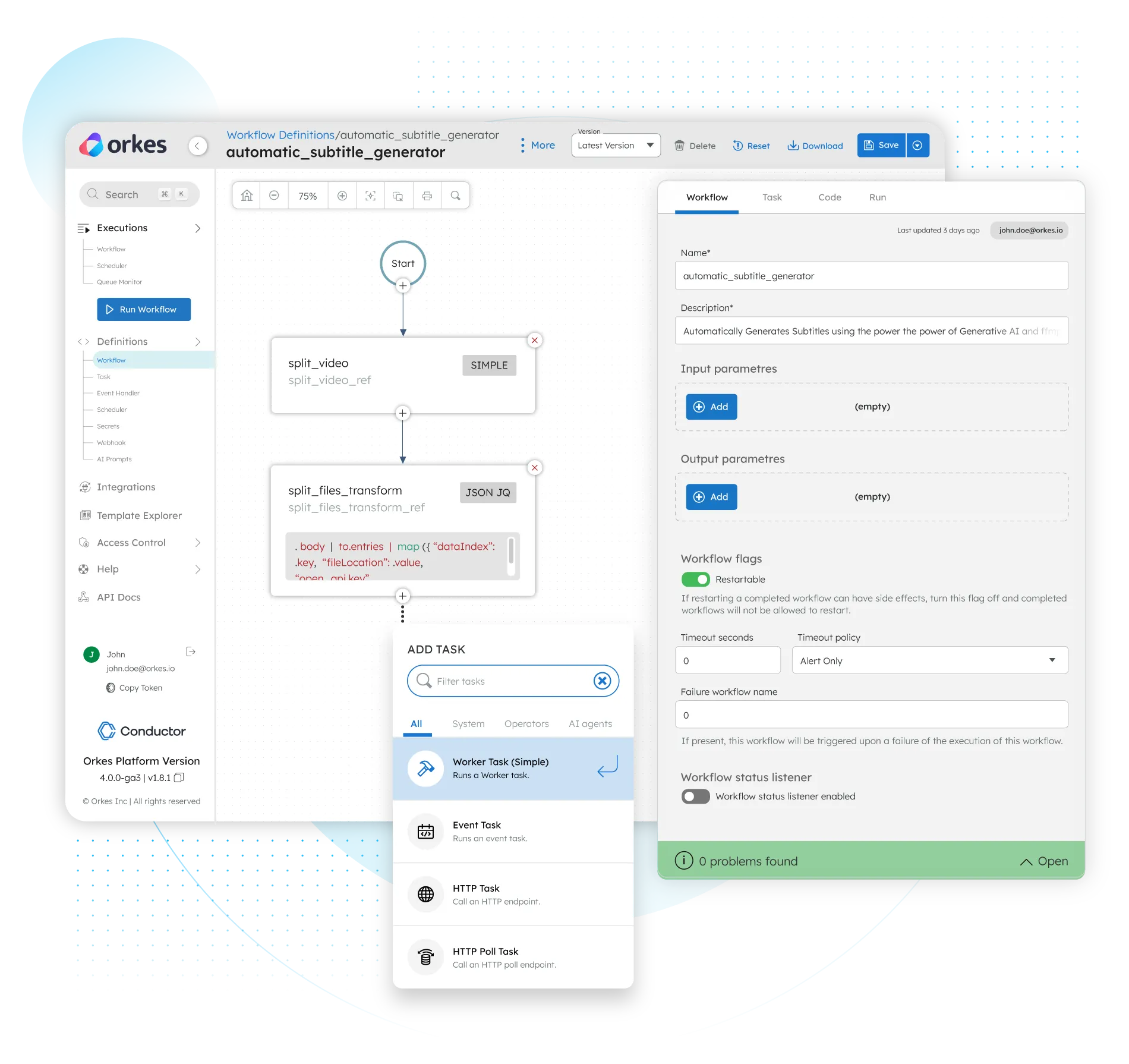
Common functions are encapsulated as System Tasks or Operators, so you don’t need to spend time writing boilerplate code. Calling or polling an HTTP endpoint? Check. Publishing an event message? Check. Searching a vector database? Check. Orkes Conductor lets you move fast without losing the flexibility and control when you need custom logic.
Here’s all integrations across AI/LLMs, vector databases, message brokers and other enterprise systems and services.


Deployment Models
Cloud Infrastructure


Single Sign On
Access Control
Granular RBAC for resources (workflows, tasks, secrets, domains, integrations, AI prompts)
User roles and namespaces
Secret Management
Workflow Creation
Visual UI
Workflow Versioning
Fully supported, easy rollback and migration
Complicated configuration required
Workflow-Task Decoupling
Built-in System Tasks and Operators
Integrations
Human-in-the-Loop Workflows
Workflow Signals
Schema Validation
Brownfield Development
Supported SDKs
Java, Python, JavaScript, TypeScript, Go, C#, Clojure
Java, Python, TypeScript, Go, .NET, PHP
API Support
Open Source License
Apache 2.0
MIT
Parallelism
Supports tens of thousands of parallel tasks per workflow and millions of workflows daily, engineered to scale to billions
Can operate at large scales but limited by concurrency and parallelism of running workflows
Resilience
Supports workflow reruns, restarts, retries from failed tasks
Supports workflow reruns and restarts
Long Running Workflows
Error Handling
Workflow Monitoring
Execution Visualization
Workflow Monitoring
Performance Metrics Dashboard
AI Tasks
Prompt Management
Human-in-the Loop support
AI Integrations
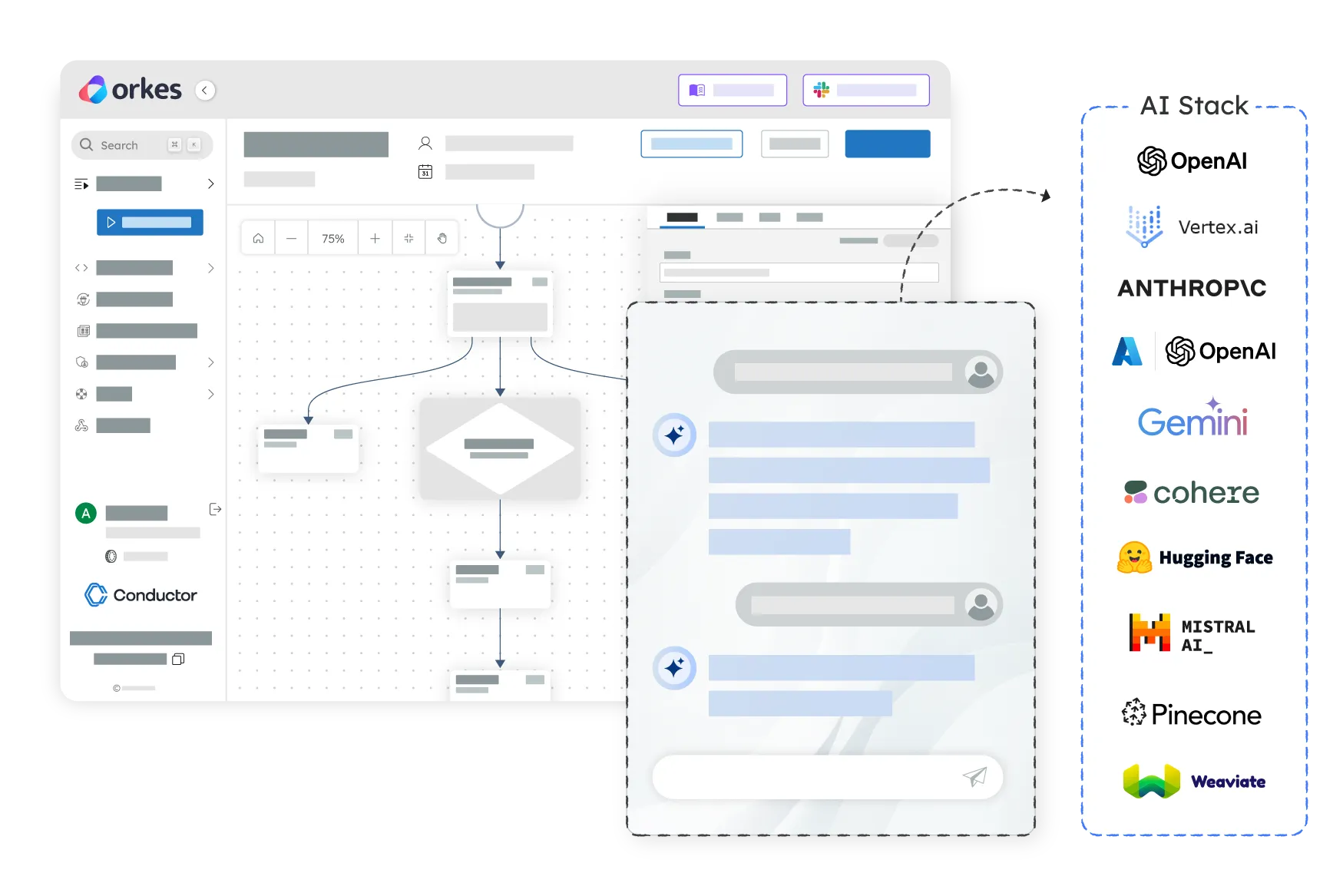
Temporal defines workflows as durable functions written in application code. Orkes separates orchestration logic from business logic: workflows are represented as JSON-based task graphs, while application code runs in independently deployed workers. This makes Orkes workflows easier to visualize, version, and update without coupling every workflow change to an application deployment.
Orkes is a strong fit when you want orchestration logic to be visible outside application code, need to coordinate services written in multiple languages, or want one platform for microservices, APIs, events, human tasks, and AI agents. It is particularly well suited to teams that want developers, product managers, and operations teams to share a common view of how processes execute.
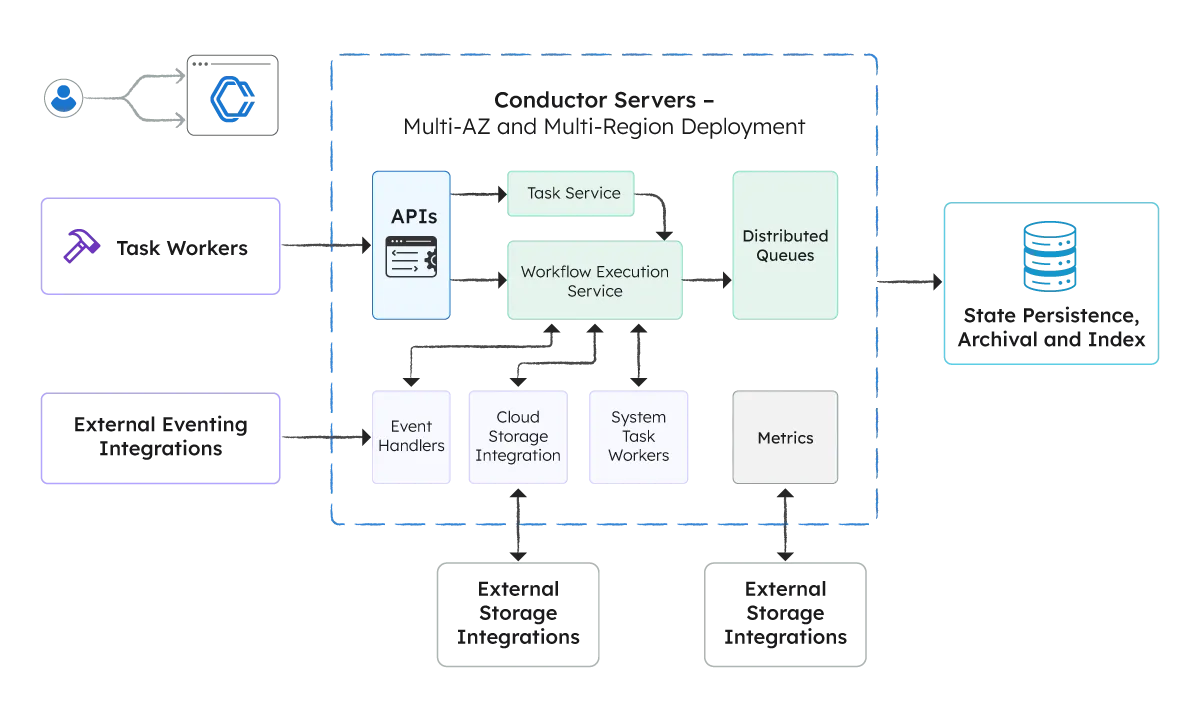
Both platforms are designed for durable production workloads. Orkes provides workflow design, execution monitoring, task queues, versioning, human tasks, security, and debugging within a managed control plane. This reduces the additional platform work required to give engineering and operations teams visibility and control across running workflows.
Temporal reconstructs workflow state by replaying event history through deterministic workflow code. As that code evolves, teams must account for replay compatibility through patching, worker versioning, and testing. Orkes persists workflow and task state in the orchestration engine, so workers execute business logic without replaying the entire workflow definition.
Yes. Orkes workflows can wait for external events, callbacks, timers, human decisions, or asynchronous task completion. Execution state remains durable during extended pauses, worker failures, and service restarts, allowing the workflow to resume from the appropriate step instead of starting over.
Yes, but their approaches differ. Temporal provides durable primitives developers can use to build reliable agent applications. Orkes provides native capabilities for orchestrating agents, workflows, services, and humans together, including LLM tasks, prompt management, tool integrations, multi-agent patterns, and support for external agent frameworks.
Temporal provides event history and a web interface for inspecting workflow executions. Orkes presents the workflow as a visual task graph and shows the path taken, task status, inputs, outputs, retries, and failures in context. This can make troubleshooting more accessible to developers, operators, support teams, and other authorized users.
Yes. Workers can be written in different programming languages and coordinated within the same workflow. This allows enterprises to orchestrate polyglot services without placing the entire process inside a single language-specific workflow implementation.
Yes. Because Orkes separates the workflow definition from worker implementations, teams can update routing, retries, timeouts, task configuration, and other orchestration logic without necessarily rebuilding and redeploying the underlying services. Workflow versions provide control over how new and existing executions are handled.
Not necessarily. The primary effort is typically re-expressing Temporal workflow logic as a Conductor task graph. Existing services and much of the underlying business logic can often be reused as Orkes workers. The exact migration effort depends on how tightly the orchestration logic is coupled to the current application code.
Both platforms provide execution visibility, but Orkes makes the workflow definition and runtime path visual by design. Teams can inspect task-level inputs, outputs, status, retries, and failures through the same interface used to understand the workflow. This gives technical and operational teams a shared view of production execution.
Temporal Cloud uses consumption-based pricing measured primarily through Actions, capacity, storage, and support. Orkes uses cluster-based pricing for enterprise deployments, providing dedicated capacity without charging for each individual workflow action. The better economic model depends on workload volume, execution patterns, retention requirements, and operational needs.
Orkes Conductor is built on Conductor, the open-source orchestration engine originally created at Netflix. Orkes extends that foundation with managed infrastructure, enterprise security, governance, observability, high availability, and production support.